Power Admin - Bootstrap Admin Dashboard Template
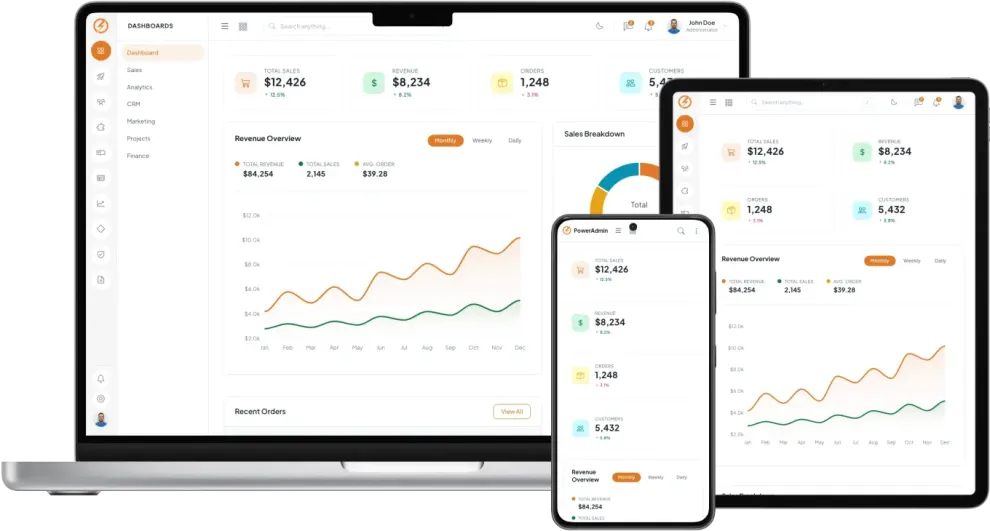
PowerAdmin is a premium Bootstrap 5 admin dashboard template designed for building professional web applications, SaaS platforms, and internal business tools. It features a distinctive dual-panel sidebar with an icon strip and collapsible navigation panel, clean Plus Jakarta Sans typography, and a carefully crafted warm orange accent color scheme with full light and dark mode support.
7 Purpose-Built Dashboards
PowerAdmin includes seven specialized dashboard layouts, each designed for a specific use case:
- Main Dashboard - Revenue overview with area charts, sales breakdown, recent orders, and team activity
- Sales Dashboard - Sales metrics, conversion funnels, and performance tracking
- Analytics Dashboard - Traffic analysis, visitor insights, and engagement metrics
- CRM Dashboard - Customer pipeline, deal tracking, and contact management overview
- Marketing Dashboard - Campaign performance, social metrics, and lead generation
- Projects Dashboard - Task progress, milestones, and team workload
- Finance Dashboard - Financial summaries, expenses, and budget tracking
8 Built-in Applications
Ready-to-use application pages that cover the most common admin panel needs:
- Calendar - Event scheduling and management
- Kanban Board - Visual task and project management
- Chat - Real-time messaging interface
- Contacts - Contact directory and management
- File Manager - File browsing and organization
- Email - Inbox and email composition
- Todo List - Task tracking and checklist management
- Support Center - Help desk and ticket management
Comprehensive User Management
PowerAdmin provides a complete user management system with users list, detailed user view, user edit forms, profile pages, account settings, notification preferences, activity logs, and roles and permissions management.
Innovative Dual-Panel Sidebar Navigation
The template features a unique sidebar design with a left icon strip using Phosphor icons and a collapsible right navigation panel with drilldown submenu interactions. The icon strip remains visible on tablet screens while the panel collapses, providing an intuitive navigation experience across all device sizes.
Rich UI Components and Widgets
Over 18 Bootstrap UI components are included along with 6 widget categories covering cards, banners, charts, apps, and data displays. The template also includes 8 form page types with rich text editors (Quill and TinyMCE), date and time pickers (Flatpickr), advanced select inputs (Choices.js), file upload, form validation, and multi-step wizard forms.
Three Charting Libraries and Five Icon Sets
PowerAdmin integrates ApexCharts, Chart.js, and ECharts for data visualization. For icons, it includes Bootstrap Icons, Remix Icons, Font Awesome, Phosphor Icons, and Lucide Icons, giving you thousands of icons to choose from.
Authentication and Utility Pages
Seven authentication page layouts are included: login, register, forgot password, reset password, email verification, two-factor authentication, and lock screen. Additional utility pages include contact, invoices, pricing, FAQ, timeline, search results, and error pages (404, 403, 500, maintenance, and coming soon).
Light and Dark Color Schemes
PowerAdmin ships with professionally designed light and dark color schemes with a built-in theme switcher. The entire color system is powered by CSS custom properties, making it simple to customize the accent color, backgrounds, borders, and status colors to match your brand.
- Last Updated:Apr 08, 2026
- Built with:Bootstrap v5.3.8
Similar Templates