
Girder - General Contractor Bootstrap Template
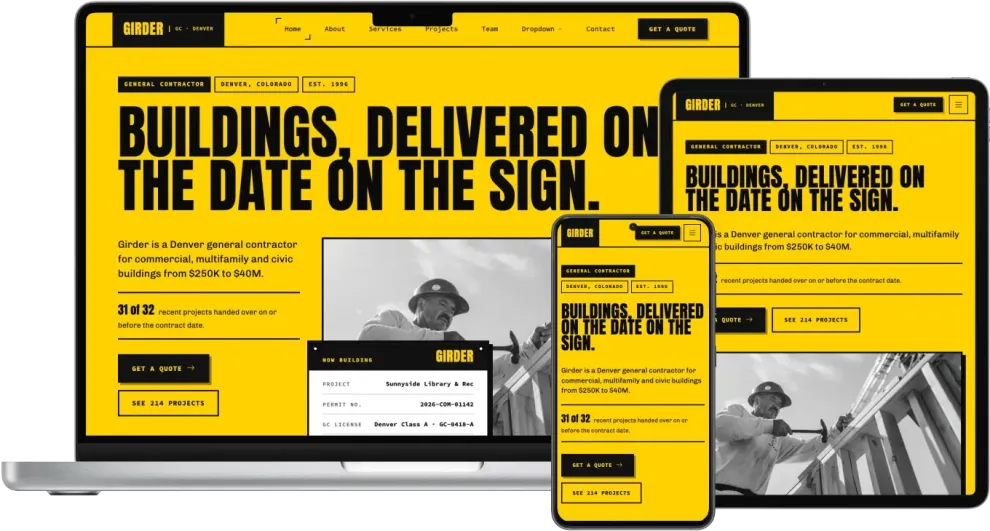
p>Girder is a bold, multi-page general contractor template built on the Bootstrap 5 framework. It is written for a Denver contractor that builds commercial, multifamily and civic buildings, and it answers what an owner or developer asks before hiring one: what have they built, are they licensed, insured and bonded, how long will it take, what will it cost and how do I get a quote. The signature element is the jobsite sign: a black-framed placard with bolt heads at its corners that lists the project, permit number, license, superintendent and completion date. It sits over the hero photo and returns in the closing call to action, on the contact page, on both detail pages and as the spec plate on every project card. The look is loud and square-cornered, with a signal-yellow ground, black type and buttons, headings in Anton, body text in Chivo and labels in Source Code Pro.
Who It's For
Girder suits general contractors, commercial builders, design-build firms and construction managers. Its project index, schedule chart, credentials list and quote form also fit multifamily and residential builders, renovation and fit-out companies, civil and industrial contractors, roofing and concrete firms and any trade business that wins work by showing what it has built and proving it can be trusted.
Pages Included
- Home - ten sections: a type-led hero with a photo and the jobsite sign, a scrolling ticker of company facts, an about block with a company ledger, six numbered services with size, price and schedule, three featured projects, animated statistics, a 56-week schedule chart, testimonials, a license, insurance and bonding list, and a closing call to action.
- About - a company timeline from 1996 to today, six numbered site rules, a safety record with the EMR rating and a checklist, and a table of the equipment the company owns.
- Services - six services, each with a photo, scope list and price range, a comparison table of hard bid, CM at risk and design-build contracts, an FAQ accordion and a call to action.
- Service Details - a full page for one service with a switcher between all six, a spec sign for size, budget, schedule and lead, a scope checklist, four steps and a client quote.
- Projects - nine projects filtered by Multifamily, Commercial, Civic and Industrial, a grid of repeat clients and a call to action for owner references.
- Project Details - a full case study with the brief, what was done, an image gallery, a project sign for owner, size, contract, permit and handover date, and the owner's quote.
- Team - four leadership profiles, a superintendent roster with each person's current job and completion date, and a careers section with open roles and pay ranges.
- Contact - a get-a-quote form with project type, budget range, size and start date, a bid desk card with address, phone, email and hours, a map with directions, and six answers about what to send for a bid.
- Starter Page - a blank page with the header, page title and footer in place.
Key Features
- Jobsite sign cards that list project, permit, license, superintendent and completion date, used in the hero, call to action, contact page and detail pages.
- Project cards with spec plates showing job number, type, size, year and place, in a filterable project index powered by Isotope.
- Schedule chart built in HTML and CSS: seven phases drawn as bars across 56 weeks, with three client commitments below.
- Credentials list for license number, liability insurance, bonding capacity, safety rating and certifications.
- Priced services with size ranges, starting prices and typical schedules, plus a contract comparison table.
- Get-a-quote form with project type and budget dropdowns, size and start date fields, and loading, error and success states.
- Scrolling fact ticker and hazard-stripe dividers made with CSS only, no extra library.
- Grayscale photography that keeps stock images in line with the yellow and black palette; project photos return to color on hover.
- Animated statistics with PureCounter and an FAQ accordion.
- Sticky header with the logo in a black block, a "Get a quote" button, a dropdown navigation menu with corner-bracket hover and a full-screen mobile menu.
- Realistic copy for a contractor, with project names, square footage, prices, schedules, license numbers and team roles instead of filler text.
Design and Customization
Girder is themed with CSS variables. The background, surface, text, heading and accent colors are set once, alongside two presets that sections switch between: a warm white and a true black, where the buttons turn yellow. Change the ground color and the hero, the signs and every yellow section follow. Square corners, the hard offset card shadow and the three-pixel card frame are shared design tokens. Buttons, signs and project plates use the same styles in every section, so new sections can match the existing design. Fonts load from Google Fonts and can be swapped in one place.
- Last Updated:Nov 20, 2026
- Built with:Bootstrap v5.3.9
Similar Templates


60%Off
Premium Lifetime Access
All 178 website templates, 10 admin templates and the Bootstrap Builder. Pay once, use them forever.